 PickPundit

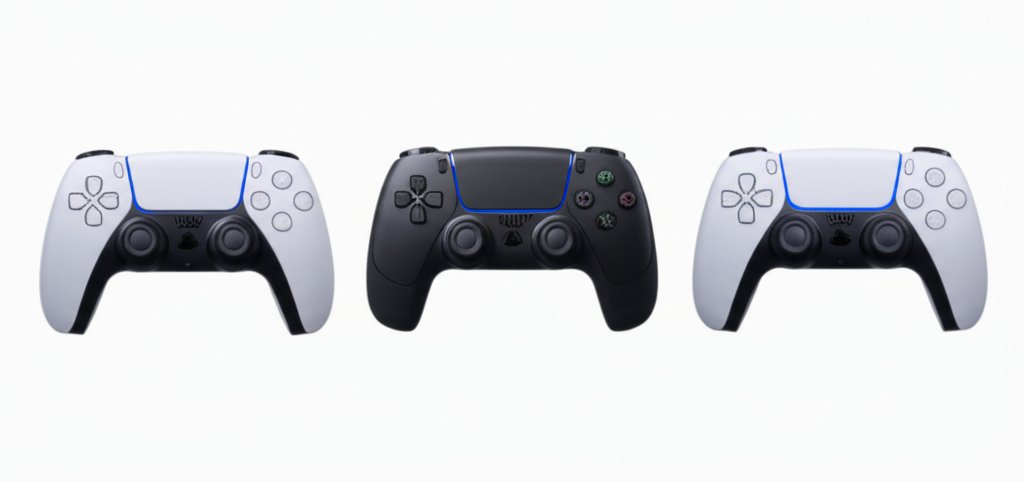
Complete gaming controllers buying guide. Learn what features matter, compare top products, and find the best gaming controllers for your budget.
View Top Picks →Table of Contents
Gaming Controllers: Platform Compatibility, Ergonomics, and Wired vs Wireless Trade-offs
Gaming controllers vary significantly in compatibility, feel, and features. Understanding options helps select controllers matching gaming platforms and preferences.
Platform Compatibility
Console controllers are designed for specific platforms. Xbox controllers work on Xbox and PC; PlayStation controllers work on PlayStation and (with software) PC.
Third-party controllers may support multiple platforms. Verify compatibility before purchasing.
PC gaming accepts many controller types but may require software configuration.
Mobile gaming uses Bluetooth controllers with varying compatibility.
First-Party vs Third-Party
First-party controllers (Xbox, PlayStation, Nintendo) guarantee compatibility and build quality at premium prices.
Third-party options cost less but quality varies wildly. Some match first-party; others are clearly inferior.
Licensed third-party controllers (officially approved) typically offer better compatibility than unlicensed alternatives.
Wired vs Wireless
Wireless provides freedom of movement and cleaner setup. Requires charging or battery replacement.
Wired eliminates battery concerns and provides minimal input latency. Cables can tangle and limit positioning.
Competitive gamers sometimes prefer wired for latency reduction, though modern wireless latency is minimal.
Ergonomic Considerations
Controller size should fit hand size. Large controllers strain small hands; small controllers cramp large hands.
Button placement affects comfort during extended sessions. Asymmetric vs symmetric stick placement is personal preference.
Weight affects fatigue. Lighter controllers reduce strain; heavier controllers may feel more substantial.
Battery Life
Rechargeable internal batteries: convenient but eventual capacity degradation.
Replaceable batteries: AA batteries are available anywhere; rechargeable AAs reduce ongoing costs.
Manufacturer claims often exceed real-world battery life. Expect 20-40 hours typical for wireless controllers.
Special Features
Haptic feedback (advanced vibration) enhances immersion in supported games.
Adaptive triggers (PlayStation 5) provide resistance feedback.
Back paddles/buttons add inputs accessible without moving thumbs from sticks.
Audio jacks enable headset connection through controllers.
Build Quality Indicators
Stick drift (unwanted input from centered sticks) is common quality issue. Hall effect sticks resist drift better.
Button feel should be consistent and responsive. Mushy or sticky buttons indicate quality issues.
Trigger mechanisms should move smoothly without catching.
Competitive Gaming Needs
Pro controllers offer features like adjustable sensitivity, remappable buttons, and hair triggers.
Tournament rules may restrict controller modifications.
Practice with competitive controller before tournaments—adjustment period exists.
Customization Options
Removable thumbsticks allow height and shape preferences.
Interchangeable D-pads suit different game types.
Shell modifications change appearance and grip texture.
Practical Recommendations
For console gaming, first-party controllers ($50-70) provide reliable, guaranteed compatibility.
For PC gaming, Xbox controllers offer broadest compatibility and driver support.
For competitive play, consider pro-level controllers ($100-200) with back paddles and quality components.
Frequently Asked Questions
ゲーム コントローラーを購入するときは、何を探すべきですか?
主な要因には、ビルドの品質、ユーザー レビュー、およびコストパフォーマンスが含まれます。 Redthunder Redthunder 60% ゲーミング キーボードとマウスの組み合わせなどの最高評価のオプション (2,364 件のレビューから 4.3★) は、このカテゴリの品質を示しています。
ゲーム コントローラーの通常の料金はいくらですか?
価格は 17 ドルから 80 ドルで、ほとんどの高品質のオプションは 48 ドル前後です。 25 ドル未満の予算オプションは、時折使用できる場合に使用できますが、72 ドルを超えるプレミアム モデルはより優れた耐久性と機能を提供します。
現在最も人気のあるゲーミング コントローラーはどれですか?
Redthunder 60% ゲーミング キーボードとマウスの組み合わせは、現在、2,364 の検証済みレビューから 4.3★ で最高評価です。 すべてのトップ ピックについては、/best/gaming-controllers で完全な比較を確認してください。
⚖️ Quick Comparison
| Product | Price | Rating | Key Feature |
|---|---|---|---|
|
#1
|
$39.99 | 60% Compact Layout - Ultra-compact design maximizes desktop space, ideal for FPS... | |
| $35.99 | Multi-device Connectivity AULA light up keyboard supports Bluetooth 5.0, 2.4GHz ... | ||
| $59.99 | ULTIMATE GAMING BUNDLE – The RX250 has everything you need to level up your gami... |


