PickPundit
📺 सर्वश्रेष्ठ स्ट्रीमिंग मीडिया प्लेयर कैसे चुनें: पूर्ण ख़रीदना गाइड

Complete streaming media players buying guide. Learn what features matter, compare top products, and find the best streaming media players for your budget.
View Top Picks →Table of Contents
Streaming Media Players: Converting Any TV to Smart TV
Streaming devices connect TVs to Netflix, YouTube, and hundreds of apps—transforming older TVs or bypassing clunky built-in smart TV software. Understanding ecosystem differences and hardware capabilities helps choose devices that match viewing habits.
Why External Streaming Devices
Even smart TVs benefit:
Better interface: Streaming devices often have smoother, faster interfaces than built-in TV software.
Longer support: TV software updates stop; external devices continue receiving updates.
Portability: Take device to hotel, new TV, friend's house.
Ecosystem preference: Match your other devices (Alexa, Google, Apple).
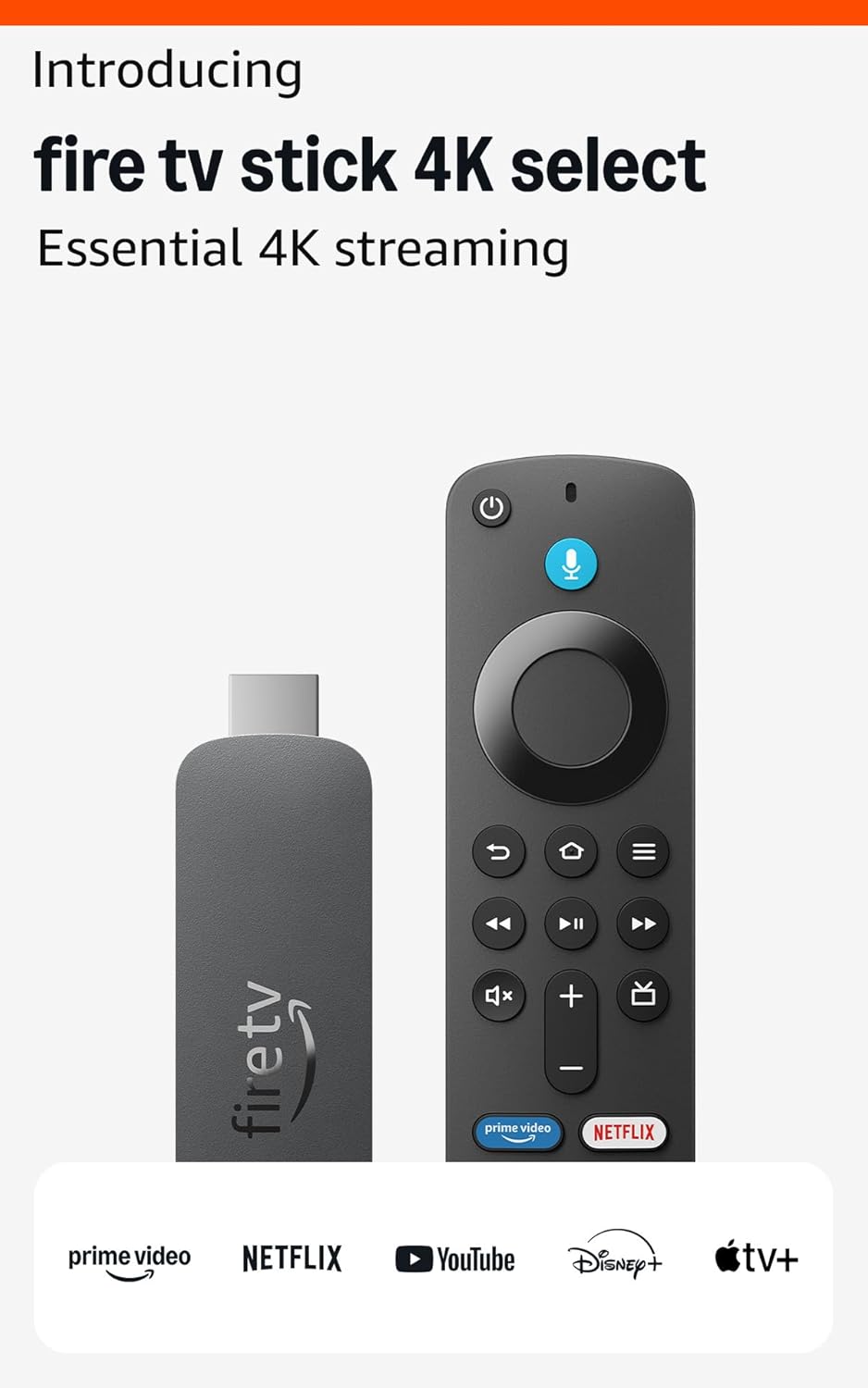
The Amazon Fire TV Stick 4K represents excellent value in streaming hardware.
Streaming Stick vs Box
Form factor differences:
Sticks (Fire TV Stick): Compact, plug into HDMI, powered by USB. Portable, affordable.
Boxes (Apple TV, Nvidia Shield): Larger, more powerful. Better for gaming, high-end use.
Performance difference: Boxes generally faster, more storage, better for demanding apps.
Price difference: Sticks $30-50, boxes $100-200+.
4K and HDR Support
Video quality capabilities:
4K resolution: 3840×2160 pixels. Requires 4K TV to benefit.
HDR (High Dynamic Range): Better contrast, brighter highlights, more colors.
HDR formats: HDR10 (universal), HDR10+ (Samsung), Dolby Vision (premium).
Fire TV Stick 4K: Supports 4K, HDR10, HDR10+, some Dolby Vision.
Fire TV Stick 4K vs Max
Amazon's lineup explained:
4K Select: Entry 4K streaming, ambient experience features.
4K Max: Faster processor, WiFi 6E, better for gaming and demanding apps.
Which to choose: Max for heavy users, Select adequate for most viewers.
Ecosystem Lock-in
Platform considerations:
Amazon Fire TV: Alexa integration, Amazon Prime prioritized.
Roku: Neutral platform, all services equal, ad-supported interface.
Apple TV: Apple ecosystem integration, premium pricing.
Google Chromecast: Google integration, cast-first design.
Content access: All major services (Netflix, Disney+, etc.) work on all platforms.
Voice Control
Speaking to your TV:
Alexa (Fire TV): "Alexa, play Stranger Things"—integrates with smart home.
Google Assistant (Chromecast): Google ecosystem integration.
Siri (Apple TV): Apple ecosystem commands.
Usefulness: Voice search across apps genuinely convenient. Smart home control bonus.
WiFi Performance
Network matters for streaming:
WiFi 5: Standard, adequate for 4K streaming.
WiFi 6/6E: Better in congested networks, future-proofing.
Ethernet option: Some devices offer ethernet adapters for reliability.
Bandwidth needs: 4K streaming requires 25+ Mbps. HDR needs more.
Storage Limitations
App and download capacity:
8GB storage: Sticks typically. Limits installed apps.
16-32GB: Boxes offer more. Important for gaming or many apps.
Expandable storage: Some devices support USB storage expansion.
Cloud reality: Most content streams; storage matters less than it seems.
Gaming Capability
Beyond streaming:
Casual games: Most streaming devices handle simple games.
Cloud gaming: Luna, Xbox Cloud Gaming work on Fire TV.
Serious gaming: Nvidia Shield for local gaming capability.
Controller support: Bluetooth controller connection on most devices.
Private Listening
Headphone features:
Mobile app pairing: Use phone for private audio.
Bluetooth headphones: Pair directly to device for silent viewing.
Remote with headphone jack: Some premium remotes include audio out.
Ads and Interface
What you see daily:
Fire TV: Amazon content promoted. Ads on home screen.
Roku: Ads in interface, neutral content promotion.
Apple TV: Cleaner interface, premium feel, premium price.
Trade-off: Lower-cost devices subsidized by advertising.
Price vs Performance
What different prices buy:
$30-40: 4K streaming sticks. Great value for most users.
$50-60: Premium sticks (4K Max). Faster, WiFi 6E.
$100-150: Streaming boxes. More power, storage, features.
$180+: Apple TV, Nvidia Shield. Premium quality and ecosystem.
Practical Recommendations
For most users: Fire TV Stick 4K or Roku equivalent. Excellent streaming at low cost.
For Alexa households: Fire TV Stick integrates naturally with existing Alexa devices.
For Apple households: Apple TV 4K for seamless ecosystem.
For gamers: Nvidia Shield for cloud and local gaming capabilities.
For older TVs: Any streaming stick instantly adds smart features.
The key insight: streaming devices are mature—even entry-level options provide excellent 4K streaming. Choose based on ecosystem preference and special features (gaming, voice assistant) rather than basic streaming capability.
Frequently Asked Questions
स्ट्रीमिंग मीडिया प्लेयर खरीदते समय मुझे क्या देखना चाहिए?
प्रमुख कारकों में बिल्ड क्वालिटी, उपयोगकर्ता समीक्षा और पैसे का मूल्य शामिल हैं। अमेज़ॅन फायर टीवी स्टिक 4K सिलेक्ट (नवीनतम मॉडल) (1,189 समीक्षाओं से 3.8★ 3.8★) जैसे टॉप-रेटेड विकल्प प्रदर्शित करते हैं कि इस श्रेणी में गुणवत्ता कैसी दिखती है।
स्ट्रीमिंग मीडिया प्लेयर की कीमत आमतौर पर कितनी होती है?
कीमतें $ 20 से $ 169 तक होती हैं, जिनमें से अधिकांश गुणवत्ता विकल्प $ 52 के आसपास होते हैं। $30 के तहत बजट विकल्प कभी-कभी उपयोग के लिए काम करते हैं, जबकि $78 से अधिक के प्रीमियम मॉडल बेहतर स्थायित्व और सुविधाओं की पेशकश करते हैं।
कौन से स्ट्रीमिंग मीडिया प्लेयर अभी सबसे लोकप्रिय हैं?
अमेज़ॅन फायर टीवी स्टिक 4K सिलेक्ट (नवीनतम मॉडल) वर्तमान में 1,189 सत्यापित समीक्षाओं से 3.8★ के साथ टॉप-रेटेड है। सभी शीर्ष चयनों के लिए /best/streaming-media-players पर हमारी पूरी तुलना देखें।
⚖️ Quick Comparison
| Product | Price | Rating | Key Feature |
|---|---|---|---|
| $19.99 | Essential 4K streaming – Start streaming in brilliant 4K Ultra HD with HDR10+. A... | ||
| $39.99 | Elevate your entertainment experience with a powerful processor for lightning-fa... | ||
| $109.99 | Our fastest-ever streaming media player - Brings lightning-fast app starts with ... |
🏆 Top Streaming Media Players We Recommend